Most people picture WordPress malware as a single obvious file: a strange plugin, a warning banner, an odd redirect. In practice, the infections that do real damage are rarely that visible. Two sites we reviewed and remediated recently show just how different a serious compromise can look from the outside, and why a surface-level scan often isn’t enough to catch one.
Key Takeaways
- Malicious code can live inside a legitimate theme file rather than a separate rogue plugin, which means a standard plugin scan won’t catch it.
- File modification timestamps are unreliable evidence when an attacker bulk-extracts files, since the whole directory can share one timestamp.
- Some infections store their payload in the WordPress database, not just on disk, and rebuild the file-based components automatically if deleted.
- Where database-stored persistence exists, the database has to be cleaned before files are deleted, or the infection restores itself within seconds.
- A fake “verify you’re human” prompt shown only to logged-out visitors is a known social engineering pattern (ClickFix), documented by the Australian Cyber Security Centre, and it targets the site’s visitors as much as the site itself.
Case study one: malicious code hidden inside a theme file
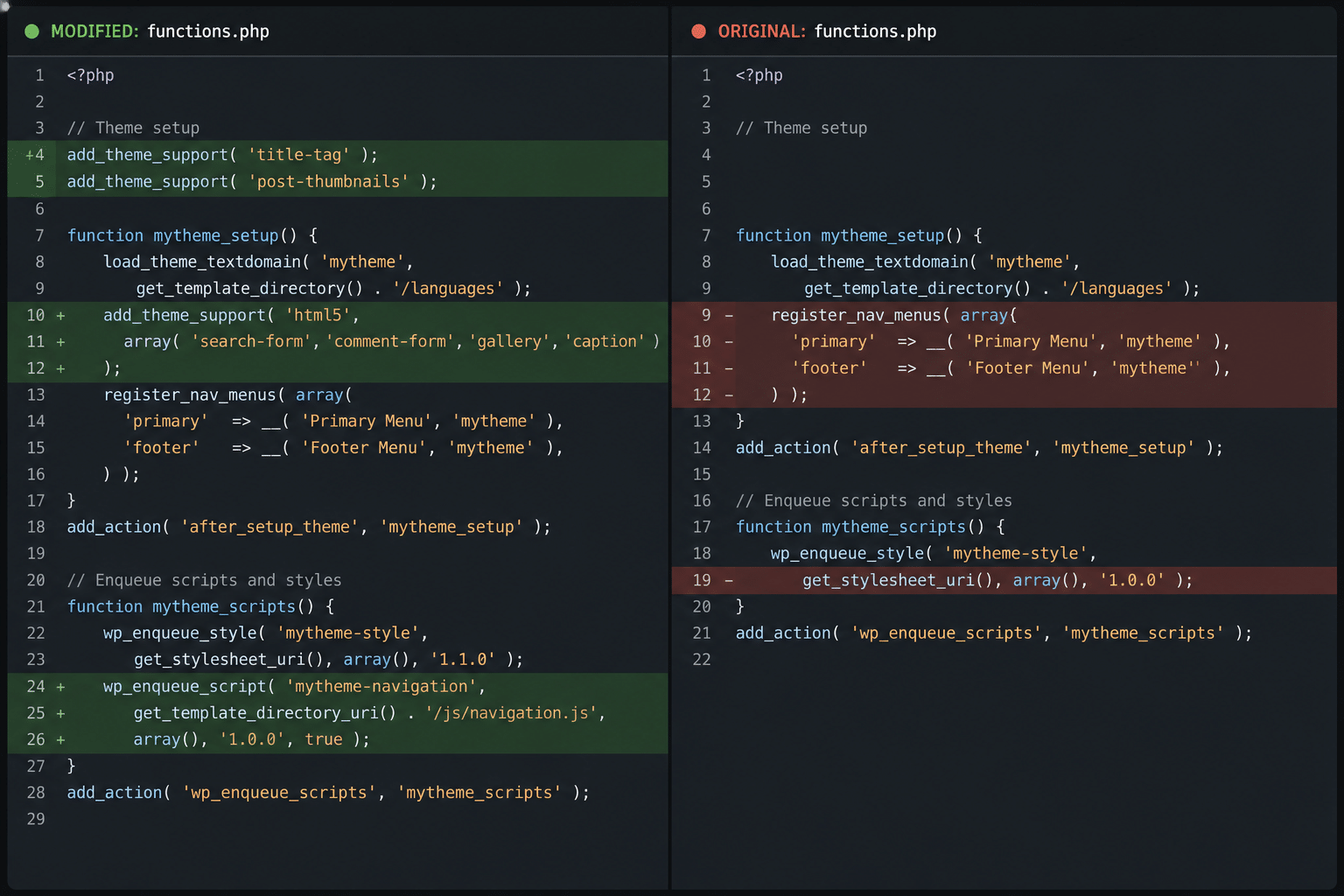
The first site looked clean on every standard check. No unfamiliar plugins, no suspicious file names, nothing flagged by a routine scan. The problem only surfaced when we compared the active theme’s core file against the official, unmodified version of that theme, line by line.
A block of code had been added directly into the theme file, written to blend in with the surrounding legitimate code rather than sit in an obviously separate location. It did two things. First, it created an undocumented way to authenticate as an administrator without a password, triggered by a specific request parameter that wouldn’t appear in any normal traffic. Second, it quietly recreated a hidden administrator account on every page load if that account was ever deleted, which meant a simple “delete the suspicious user” fix wouldn’t have held.
This is what made it hard to catch. There was no extra plugin to flag, no separate malicious file with an odd name, and file timestamps were no help either, because the entire theme directory had been extracted in one batch and shared a single timestamp across every file. The only way to find it was content-level review: reading the actual code inside a file that had every reason to look trustworthy.
Remediation was straightforward once the injection was found: strip the added code back to the original file, delete the hidden account, and rotate the site’s security keys and database credentials so any previously exposed access was closed off.
The broader lesson is the one that matters. A file-count or plugin-list scan checks whether something new has appeared. It doesn’t check whether something old has been quietly modified. Any thorough audit needs to include a diff against known-good source, not just a presence check.
Case study two: a five-layer infection built to survive cleanup
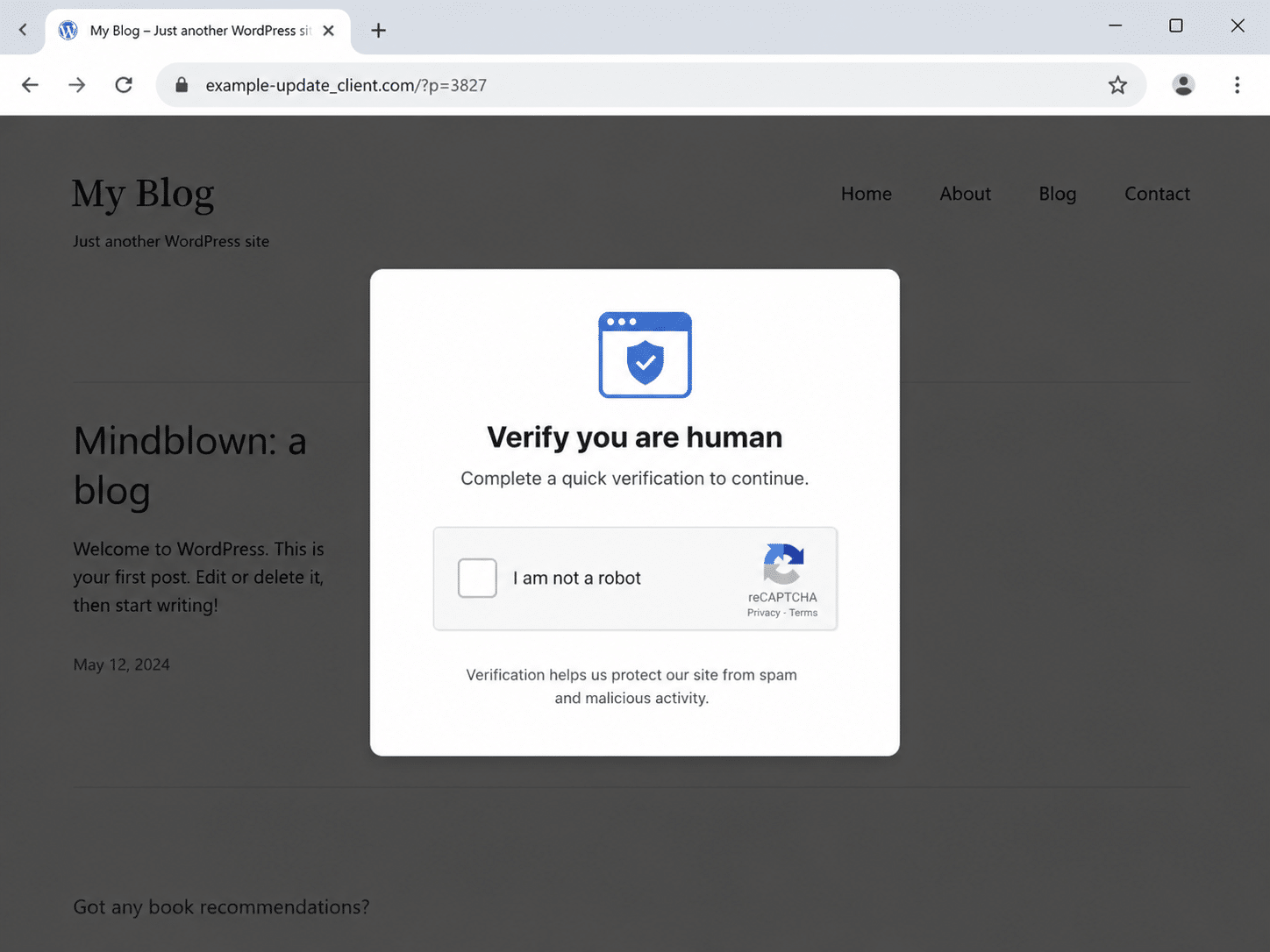
The second site was more complicated, and it started with something the client’s own team never saw. Any visitor who wasn’t logged in was shown a convincing fake “verify you’re human” prompt, styled to look like a standard Cloudflare check. It instructed the visitor to open a system command window, paste a copied command, and run it. That command installed information-stealing malware on the visitor’s own device, capable of pulling saved browser passwords and session data.
This is a known pattern called ClickFix, and it’s been documented by the Australian Cyber Security Centre as an active campaign style. What made it harder to spot on this particular site is that the malicious code checked whether the current visitor was a logged-in administrator, and simply didn’t show the prompt if they were. The client’s own team, browsing their own site while logged in, would never have seen anything wrong.
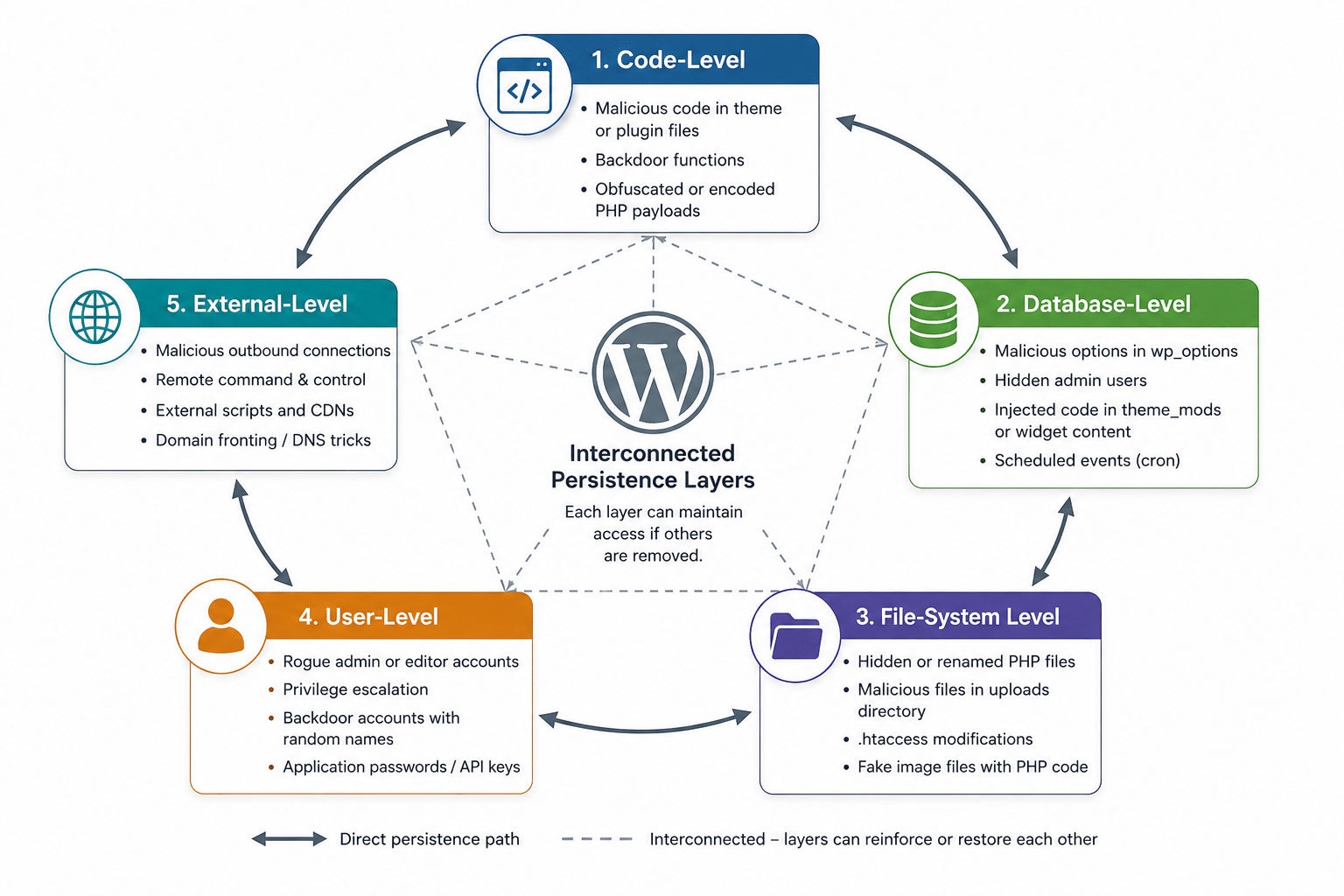
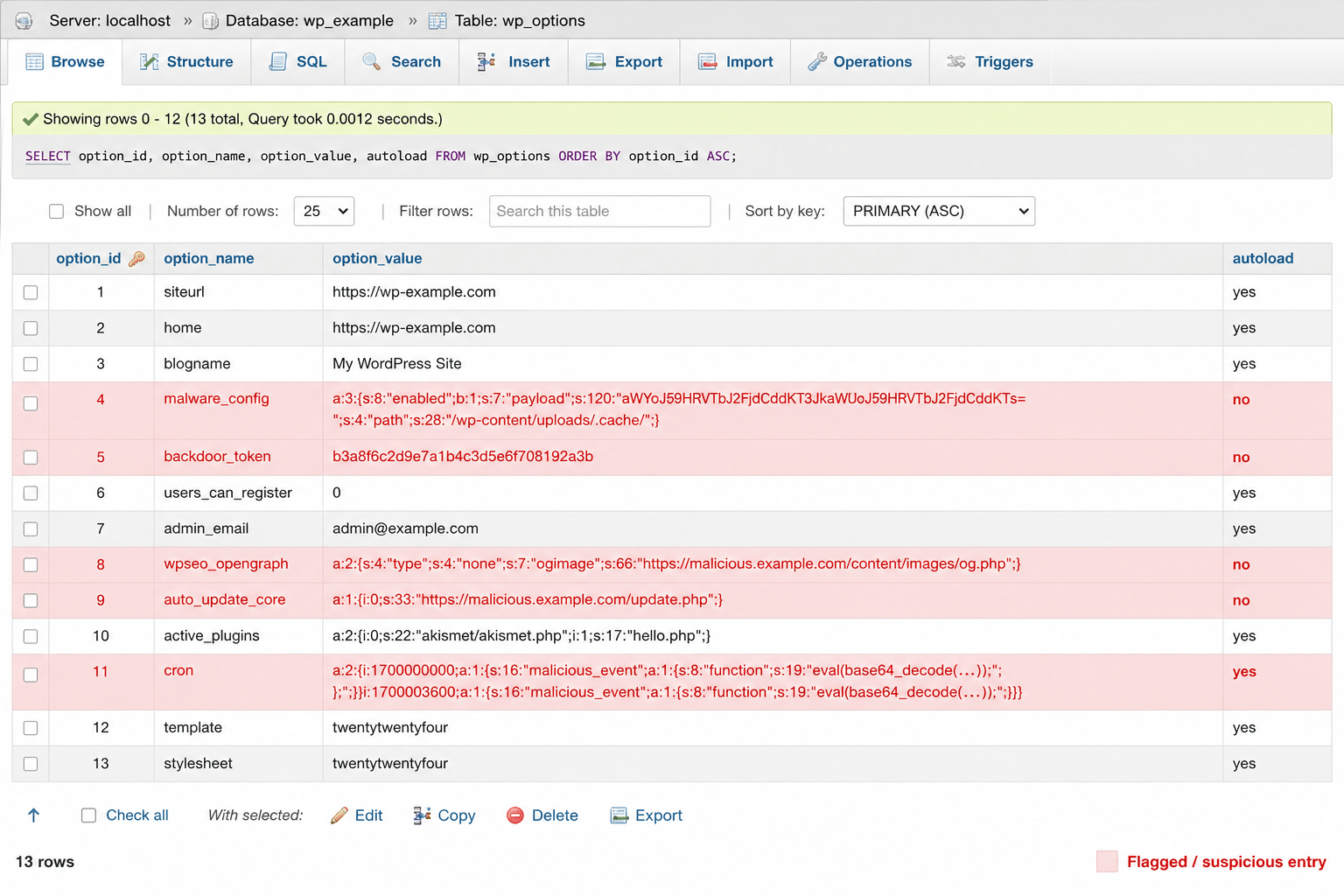
Behind that visible payload sat a genuinely resilient backdoor architecture, built from five separate but connected components. A file that ran automatically on every page load acted as a loader, rebuilding a hidden background controller from a copy stored in the database if that controller was ever deleted. The controller itself managed authentication bypass and could recreate a concealed administrator account. A disguised plugin stored its own malicious script inside a database option rather than in a file, so it wouldn’t show up in a straightforward file scan. And several near-identical backdoor scripts were scattered across non-standard folders that don’t typically get manual review.
Each piece could rebuild at least one of the others. Deleting the visible files without addressing the database first didn’t fix anything: within seconds, the site was reinfected, because the file-based components were regenerated from a base64-encoded copy sitting quietly in the WordPress options table.
Remediation had to follow a strict order. Database first: remove the stored payload and configuration entries, delete the rogue accounts, and force every active session to expire so no existing login could be reused. Only then could the files themselves be safely deleted, followed by a full verification sweep across both the file system and the database to confirm nothing had been missed or silently rebuilt in the process.
Beyond the technical cleanup, this case had follow-up implications that a straightforward “remove the malware” job wouldn’t: because the infection had database read access, every stored password hash had potentially been exposed, which meant a full credential reset and rotation of related access keys with the host. It also meant briefing the client on the fact that their own visitors may have been affected during the infection window, not just their site.
What we actually check for
Both cases came down to the same underlying gap: the malicious code sat somewhere a standard scan doesn’t look, either inside a legitimate file’s content or inside the database itself.
A few principles come out of that, consistently, across cleanup work like this.
File presence checks aren’t enough. Scanning for unfamiliar plugins or unexpected files catches the obvious cases, but it won’t catch code injected into a file that’s supposed to be there. Content-level review, comparing active files against known-good originals, is what actually finds this class of infection.
Timestamps can be manipulated or meaningless. A bulk file extraction gives every file in a directory the same modification date, which makes “what changed recently” a useless filter on its own. Timestamps are a starting clue, not evidence.
The database needs its own review. Custom code can live in stored options, serialised data, or plugin-specific tables just as easily as it can live in a file. Any audit that only walks the file system is only checking half the site.
Order of operations matters when persistence is database-driven. If a file-based component can rebuild itself from something stored in the database, deleting the file first achieves nothing. The database gets cleaned first, then the files, then a full verification pass across both.
Every infection is different
These two cases show what we found on these two specific sites. They’re a useful illustration of how sophisticated WordPress malware can get, but they’re not a checklist to apply blindly to a different infection. Attack patterns evolve, and the exact combination of files, database entries, and persistence mechanisms varies from site to site. A proper cleanup starts with a full review of the specific site in front of us, not a template pulled from the last job.
If your site is showing any of these signs
If something about your WordPress site feels off, whether that’s unexpected behaviour, a client report, or a hosting provider flag, it’s worth getting it looked at properly rather than running a quick plugin scan and hoping. Get in touch for a WordPress security review and we’ll tell you plainly what we find.