If clicking your Shopify checkout button sends customers back to the cart page instead of through to checkout, the problem might not be your theme. Possibly not a rogue app, a caching issue, or a misconfigured payment method. Shopify has a New Customer Accounts architecture, and a fix we discussed with their support team is a one-time configuration change in your Shopify admin.
Here’s what we found out from Shopify support, why it has appeared on stores that were previously working fine, and exactly what to do about it depending on whether your store is live or still pre-launch.
Key Takeaways
- The checkout button failing to redirect for us, was caused by Shopify’s New Customer Accounts requiring a verified custom subdomain to complete its authentication flow.
- Without the subdomain, the browser treats the authentication request as cross-origin and blocks it, which aborts the checkout redirect before it fires.
- Two specific console errors and a pattern of cancelled network requests confirm the diagnosis.
- The permanent fix for live stores is a subdomain configuration in Shopify admin, not a theme code change.
- A temporary, but instant fix is adding the Javascript we’ve noted below. Jump to the fix.
- Pre-launch stores on .myshopify.com have a clean interim fix while the custom domain isn’t yet connected.
What the Problem Looks Like
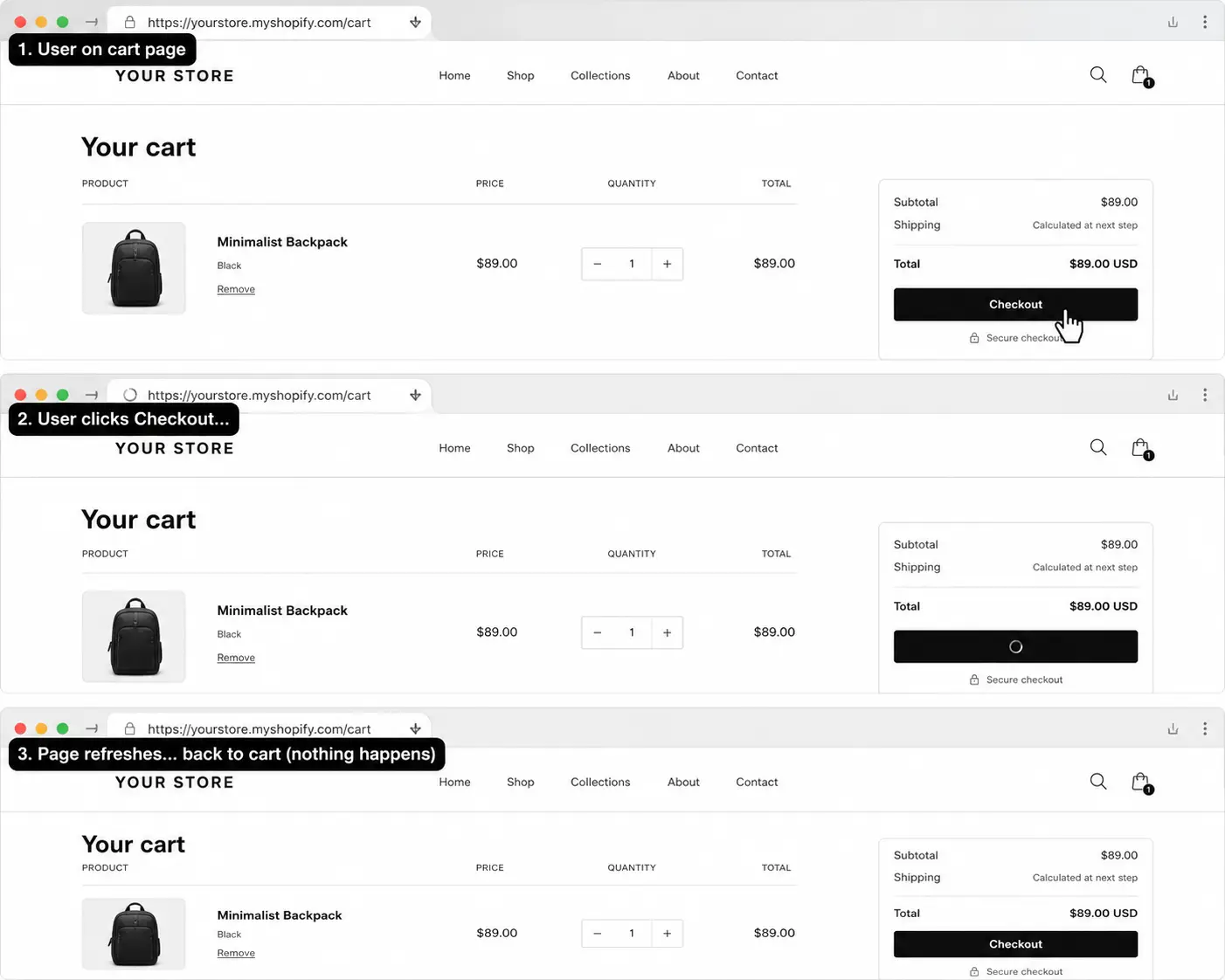
A customer clicks the checkout button on the cart page or in the cart drawer, and nothing happens. The page either refreshes in place, or for a fraction of a second you can see network activity in the browser before everything cancels and the customer ends up back where they started.
It can affect both the main cart page button and the cart drawer button. It can appear on stores that have never edited the Theme Code, and it can appear on stores that were working perfectly with no changes made.
What We Ruled Out Before Finding the Cause
Due to a number of clients suddenly complaining about a similar issue we investigated and eliminated:
- Cart template code (across a number of themes free and paid)
- Rogue app blocks on the cart page
- Domain configuration issues
- Checkout settings, including sign-in requirements and custom checkout rules
- Password protection on pre-launch stores (disabled temporarily, issue persisted)
- Shop Pay, Google Pay, and Apple Pay (all disabled, issue persisted)
- Third-party app JavaScript
The Root Cause: New Customer Accounts and the loginWithShopEmbed Handshake
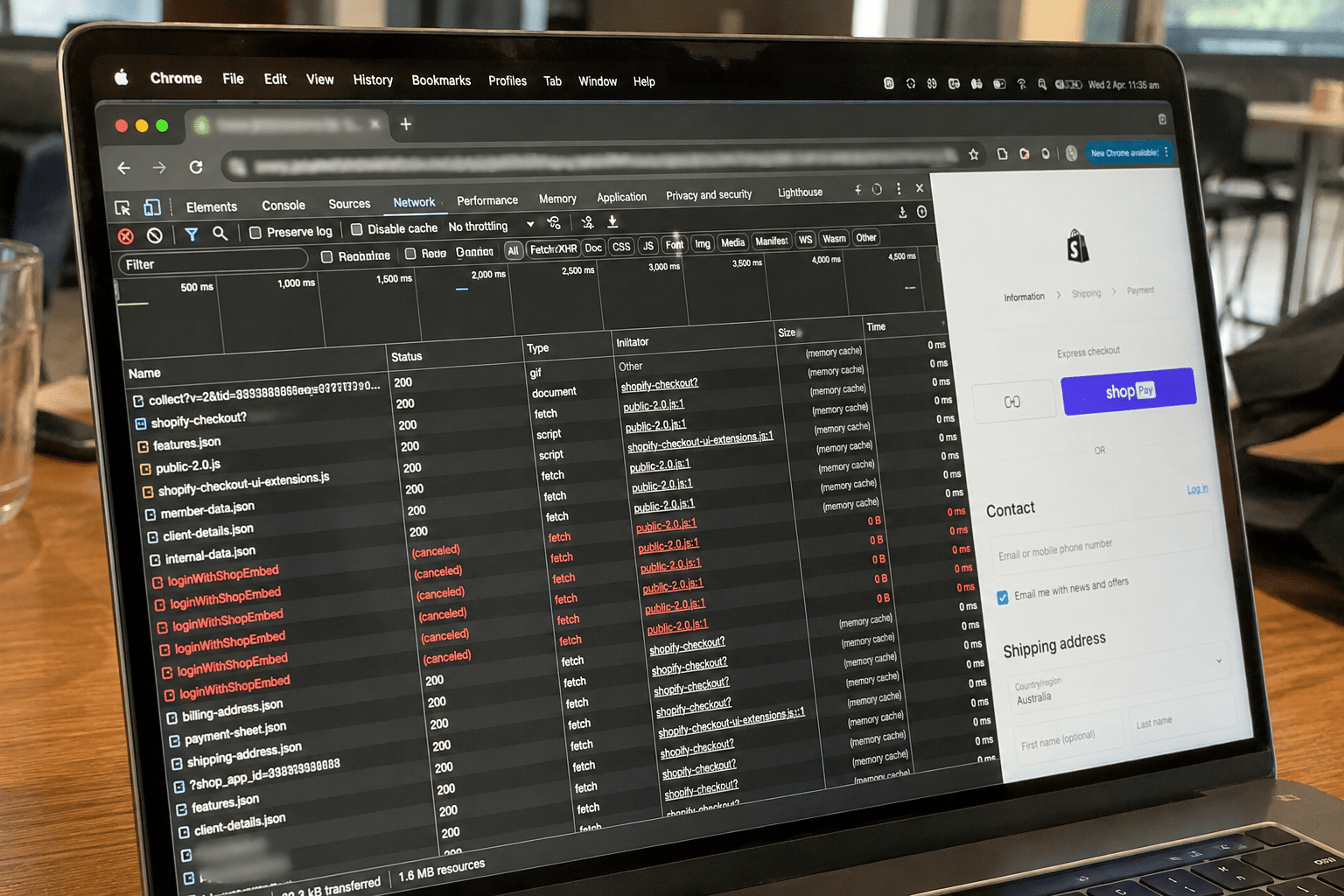
When a customer clicks the checkout button on a store using New Customer Accounts, Shopify does not simply submit a form to /checkout. Before the redirect can happen, it fires an authentication process called loginWithShopEmbed. This handshake authenticates the customer through a Shopify-managed identity layer, and the checkout navigation only proceeds once it completes successfully.
For loginWithShopEmbed to complete, the browser needs to treat the storefront and the authentication flow as belonging to the same trusted origin. This works correctly when a custom subdomain is configured for customer accounts, for example, account.yourdomain.com. When that subdomain is not in place, the browser sees the authentication request as cross-origin and its sandbox security restrictions block and cancel it. Because the authentication handshake is what triggers the checkout navigation, cancelling it aborts the redirect entirely.
This is why the page appears to do nothing, or refreshes back to cart. The button fires correctly. The network requests fire correctly. The browser then kills them before they can complete.
The console errors that confirm this diagnosis
If you open your browser’s developer console and reproduce the problem, you should see two specific errors:
- [shopify-account] <shopify-store> custom element is not registered. Ensure the storefront-components bundle is loaded so <shopify-account> can fetch data.
- Unsafe attempt to load URL [web-pixels sandbox URL] from frame with URL [same URL]. Domains, protocols and ports must match.
The second error is the key one. The browser is explicitly reporting the cross-origin conflict. If you see it, the subdomain fix covered below is your path forward.
The network requests that confirm it
On checkout button click, open the Network tab in developer tools and watch what fires. You will see a cluster of requests including authorize?analytics_context=loginWithShopEmbed (firing twice), payment-icons.svg, and a handful of analytics endpoints. Every one of them will be cancelled immediately. The cancellation of the loginWithShopEmbed authorise call is what stops the redirect from executing.
Why It Appeared on Stores That Were Previously Working
This is not a bug that has always existed. Shopify recently completed a platform-wide migration away from Legacy Customer Accounts, moving all stores to its unified identity layer. Stores that were previously relying on the old authentication architecture, which did not require the custom subdomain setup, started hitting this conflict once the new system became active on their account.
A store can go from a working checkout to a broken one with no changes made on the store side at all. The migration happened at the platform level. This is why it catches store owners off guard and why standard troubleshooting approaches (clearing cache, disabling apps, checking theme code) turn up nothing.
The Fixes
For live stores: configure a custom accounts subdomain (permanent fix)
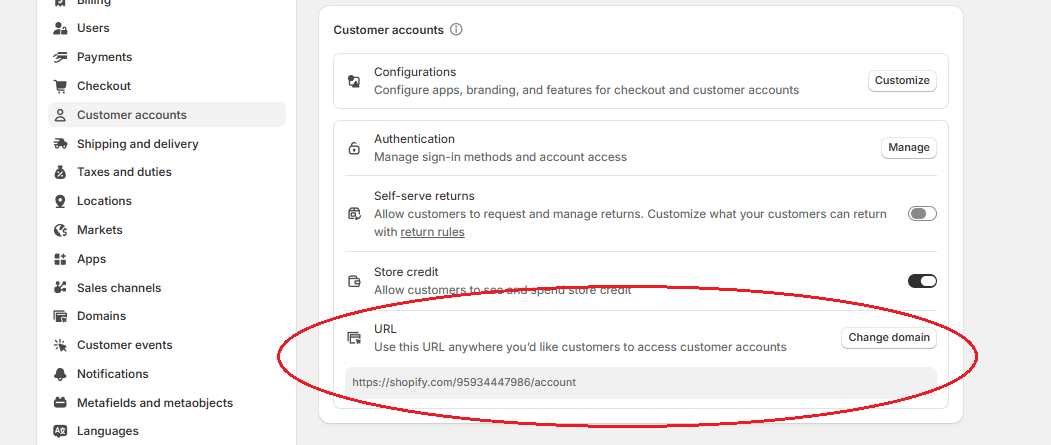
The permanent fix for any live store is to set up a dedicated third-level subdomain for customer accounts. In practice, this looks like account.yourdomain.com.
You configure this inside Shopify admin under the customer accounts settings. Once the subdomain is verified and mapped, the browser no longer treats the authentication flow as cross-origin. The loginWithShopEmbed handshake completes, and the checkout button works correctly without any changes to your theme code.
This is a one-time setup. It does not require a developer and does not involve touching your storefront templates.
For pre-launch stores on .myshopify.com: use a direct checkout link (interim fix)
Pre-launch stores sitting on a .myshopify.com domain cannot configure a custom subdomain until the primary domain is connected. The clean interim solution is to replace the standard form submit button in main-cart.liquid and cart-drawer.liquid with a direct link:
<a href="/checkout">Checkout</a>Note, you will need to style this if you have specific store branding guidelines.
This bypasses the form submission and the loginWithShopEmbed flow entirely and navigates the browser directly to /checkout. The cart session carries through correctly using this approach. It is a safe, clean stopgap until the custom domain is connected and the subdomain can be properly configured.
If you’d like to avoid removing code in the Theme Code files, you can always comment out the code and paste the new code after it. Below are two examples of comments that should work in most of the Shopify Theme Code files:
{% comment %}

commented out content

{% endcomment %}
Or
/* commented out content */
The JavaScript workaround (if you need an interim fix on a live store)
If you need a quick fix on a live store before completing the subdomain setup, add the following script to your theme.liquid file, directly before the closing </body> tag. This placement ensures the DOM is fully loaded before the script runs. However, adding it before the </head> tag also works.
<script>
document.addEventListener('DOMContentLoaded', function() {
const forms = document.querySelectorAll('form[action="/cart"]');
forms.forEach(form => {
form.action = '/checkout';
});
});
</script>
Example Placement:
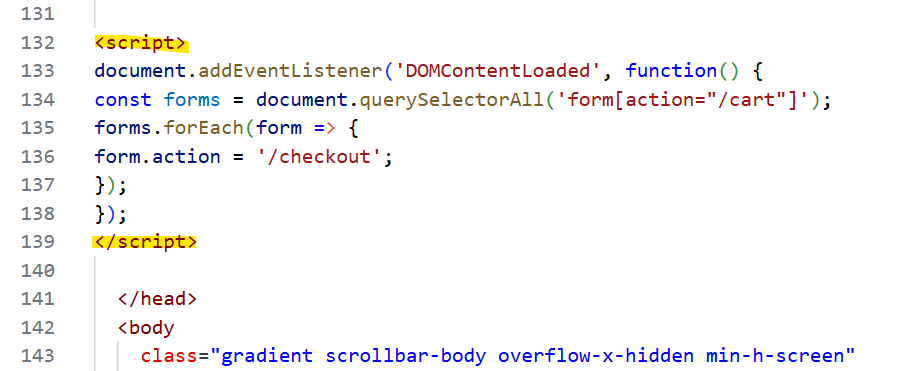
This rewrites all cart form actions to point directly to /checkout on page load, bypassing the loginWithShopEmbed authentication flow that causes the redirect to fail.
It works on most Shopify themes and will catch any form using a standard HTML cart action, including checkout buttons in the main cart page and any add-to-cart banners your theme uses.
One exception: if your theme uses a JavaScript-driven cart drawer (common in Dawn and Dawn-based themes), the drawer intercepts the click before the form action is used. In that case, this script alone will not fix the drawer. You will also need to replace the drawer’s submit button with a direct <a href=”/checkout”> link in cart-drawer.liquid, as covered in the section above.
This is a stopgap, not a permanent solution. Once the account.yourdomain.com subdomain is configured in your Shopify admin, the checkout button will work correctly without any theme code changes.
Why One Store Was Fine and Another Wasn’t
During diagnosis across affected stores, one live store, with an identical setup in most respects, had no checkout issues at all. The difference was a single configuration: a verified custom subdomain for customer accounts had already been set up on that store.
Because the subdomain was in place, the browser treated the storefront and the authentication flow as sharing a unified origin. The cross-origin restrictions never triggered, the loginWithShopEmbed handshake completed as expected, and checkout proceeded normally. It was not a theme difference. It was not a different app stack. It was the subdomain.
Summary
The Shopify checkout button sending customers back to the cart is a platform architecture issue, not a theme or app problem. Shopify’s New Customer Accounts require a verified custom subdomain to complete the loginWithShopEmbed authentication handshake. Without it, the browser blocks the request as cross-origin, the handshake fails, and the checkout redirect never fires.
For live stores, the fix is a custom subdomain for customer accounts configured in Shopify admin. For pre-launch stores, a direct link to /checkout is the clean interim approach. Neither requires modifying your cart templates.
If you need help getting this sorted on your store, Arvo’s Shopify development team can have it resolved quickly.